
Tornado Tracker by TornadoPath
Ridge Labs LLCWeather
4.884.00 Reviews
- Version
- 5.1.7
- Installs
- 50.00K
- Age Rating
- Everyone
Screenshots
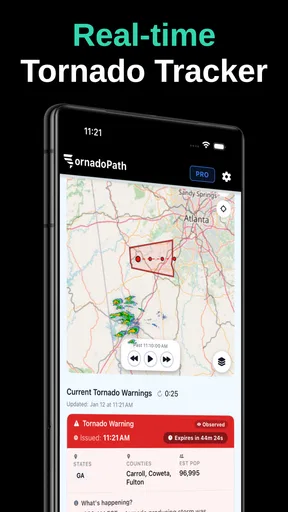
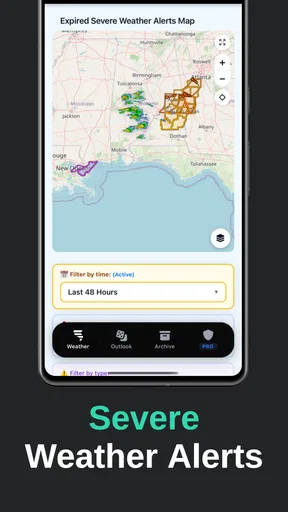
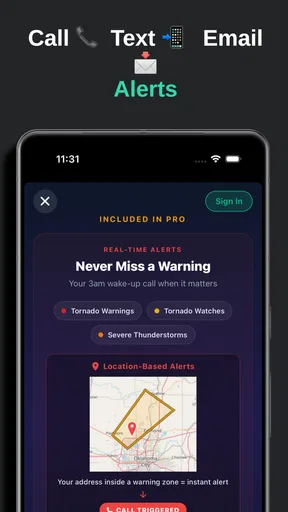
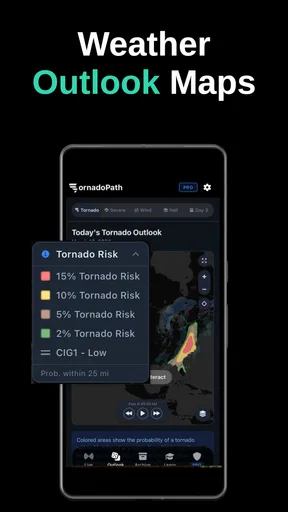
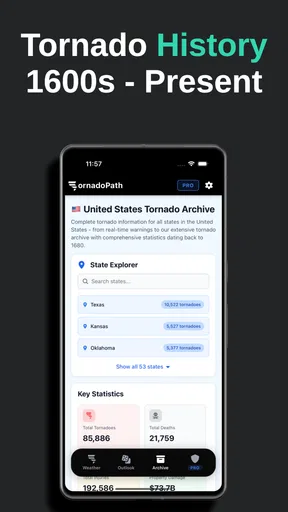
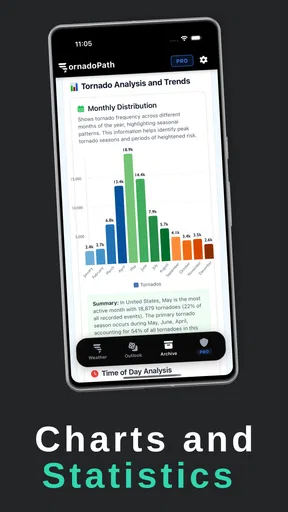
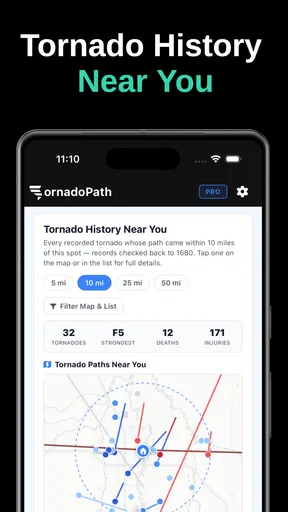
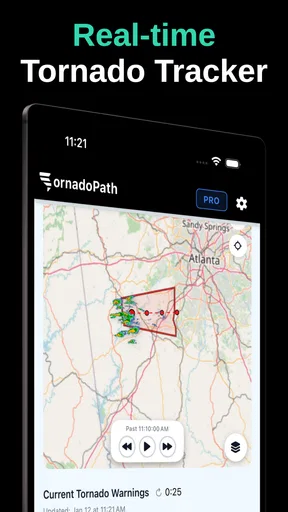
Our Review of Tornado Tracker by TornadoPath
 Analysis by Appyee
I usually approach weather apps with low expectations: I want a clear answer about what is happening near me, not a screen full of colorful layers that I have to decode. Tornado Tracker caught my attention because it focuses on severe-weather awareness rather than trying to become an all-purpose forecast dashboard. In my first week with it, the appeal was easy to understand. The app puts tornado warnings, radar information, and storm-related phone call alerts at the center of the experience.
That focus makes Tornado Tracker feel more purposeful than a standard weather app when conditions become dangerous. It is a free weather app from Ridge Labs LLC, rated for Everyone, and its core idea is simple: help me notice a serious storm threat quickly enough to make a sensible decision. The app has a 4.8 average from around 500 ratings, which suggests that its focused approach is connecting with the people who install it.
How Tornado Tracker Holds Up Beyond the First Week
I find the clearest way to judge Tornado Tracker after the first week is to ask whether it has become part of a calm, repeatable storm routine rather than another screen I check out of habit. Its focused warnings and radar can support that routine, but they work best when I already know what I will do after an alert. That longer-term question leads naturally to how the app’s current version fits into an established setup.
The first-week appeal is immediate and practical
The strongest part of the early experience is the difference between ordinary weather checking and emergency awareness. A normal forecast can tell me whether rain is likely later, but that is not the same as knowing that a tornado warning deserves immediate attention. Tornado Tracker is built around that more urgent distinction.
The live warning focus is useful when I am busy, driving, working in another room, or simply not watching the sky. Phone call alerts are especially notable because they are harder to miss than a notification that disappears among messages, calendar reminders, and social updates. I would not treat any single alert method as a replacement for common sense or local emergency guidance, but the call-oriented approach gives the app a practical role during high-risk weather.
The HD radar is also more useful when I treat it as a decision-making tool rather than a visual toy. I can look at the storm’s position, judge whether it is moving toward my area, and decide whether I need to stop an outdoor activity, bring people inside, or check on someone nearby. The best use is not staring at the radar continuously. It is checking the map when an alert arrives and then confirming what the storm is doing around me.
One habit I recommend during the first few days is to open the app during ordinary weather, before a serious warning occurs. That lets me become familiar with the radar view while the stakes are low. When a real storm develops, I do not want to spend time learning where the warning information sits or wondering whether a colored shape represents rain, a warning area, or a storm track.
Another useful early workflow is to compare the app’s alert with what I can see outside and with local official information. Tornado Tracker can help me notice a threat, but it should be part of a wider safety routine. If the app warns me while local authorities are also issuing instructions, the right response is to follow those instructions rather than waiting for the radar image to become more convincing.
Why the radar matters more than the novelty
Many weather applications make radar feel like an optional extra. Here, it is central to the reason I would keep the app installed. A radar view gives context that a short warning message cannot. It helps answer practical questions: Is the storm approaching from the west? Is the worst activity likely to pass over my route? Should I delay leaving the house? Is the rain band moving away, or is another area behind it worth watching?
That context is particularly helpful for people who live in regions where severe weather can interrupt normal plans. A parent deciding whether children should remain indoors, a small business owner watching conditions around closing time, or a traveler checking a route can all use the map differently. The app does not remove uncertainty, but it makes the uncertainty easier to see.
The trade-off is that radar requires interpretation. A dramatic-looking image does not automatically mean a tornado is occurring at my exact location, and a quiet-looking moment does not mean I should ignore an official warning. New users may initially overreact to colors or assume that every intense patch on the map has the same meaning. I found that the app works best when I use the warning information first and the radar to add geographic context second.
Month-to-month value depends on where I live
After the first week, the excitement naturally fades. That is not a weakness unique to this app; emergency tools are often most noticeable when something unusual happens. The long-term question is whether Tornado Tracker still earns space on the phone between storm events.
For someone living in an area that regularly experiences tornado watches, severe thunderstorms, or fast-changing spring and summer weather, the answer is more likely to be yes. The value is not entertainment or daily browsing. It is preparedness that becomes useful at the exact moment a routine forecast feels insufficient. I would keep it installed if I wanted a dedicated severe-weather layer without relying entirely on a general weather app.
For someone in a mild climate with rare severe storms, the app may spend long periods untouched. That does not make it pointless, but it changes how I judge it. An emergency-focused app has to justify its presence through peace of mind and readiness rather than constant daily use. If I already have a trusted local alert system and rarely face tornado conditions, a second weather app may feel unnecessary.
The app has passed the early adoption stage with more than 50 thousand installs, but its lasting value still comes down to personal risk and routine. I would not install it simply because the radar looks impressive. I would install it because I have a clear plan for using warnings when weather threatens my home, commute, workplace, or family.
A good monthly habit is to open the app briefly before the season when severe storms are most likely in my region. I can make sure I still recognize the interface, review how I want to react to warnings, and decide whether the app remains relevant to my location. This is more useful than opening it randomly every day just to watch harmless cloud movement.
The maintenance burden is low, but attention still matters
There is not much maintenance involved in keeping a focused weather app available. The current version is 5.1.7, and the app runs on Android 7.0 or later, so it is accessible to people using older compatible phones. I appreciate that broad compatibility because emergency tools should not feel limited to only the newest devices.
Still, installing an app once is not the same as maintaining a reliable warning setup. I would periodically check that the app remains installed, that the phone can receive its alerts, and that the device is not silencing notifications during sleep or battery-saving modes. I am deliberately treating those as user habits rather than promised app behavior: an alert tool is only useful if the phone is able to present the alert when it matters.
Phone call alerts also deserve a little thought. They can be valuable because they are intrusive enough to attract attention, but that same quality may be inconvenient during meetings, nighttime hours, or situations where unexpected calls create stress. I would decide in advance whether that interruption level suits my household. Someone who wants quiet, low-disruption weather updates may prefer a conventional notification-based service.
Another maintenance consideration is location relevance. Weather risk changes when I travel, move, or spend long periods away from home. A warning app is most useful when I remember where I am relying on it. If my routine includes commuting across several areas, I would not assume that one familiar location tells me everything I need to know about the road ahead.
The app is free to download, but in-app purchases range from $9.99 to $149.99 per item. That makes it important to look carefully at any purchase screen before committing. I would begin with the free experience and decide whether the app’s actual alert and radar workflow solves a problem for me. The wide purchase range means users should avoid assuming that every useful capability is included without checking what each option provides.
Where fatigue can set in
The main source of fatigue is the subject itself. Severe-weather alerts are valuable, but frequent warnings can become emotionally tiring, especially when a storm passes without causing damage in my immediate area. If I receive too many interruptions, I may start dismissing them automatically, which defeats the purpose of having a dedicated warning tool.
This is why I would avoid treating every alert as a reason to panic. I would read the warning, check the radar, consider my location, and follow local safety instructions. That small pause turns the app from an alarm generator into part of a process. The goal is not to remain anxious all day; it is to respond promptly when a credible threat affects me.
Radar can create a different kind of fatigue. Watching a storm’s movement in detail may feel reassuring at first, but it can also encourage compulsive checking. I found the feature most useful when I opened it for a specific question and then put the phone down. “Is the storm approaching my route?” is a productive question. Refreshing the map repeatedly without changing what I plan to do is usually not.
The focused design may also feel narrow for users who expect one app to cover every weather need. If I want detailed long-range forecasts, pollen information, travel planning, hourly temperature trends, or broad lifestyle features, a general weather service may be a better primary app. Tornado Tracker makes more sense as a specialist companion than as an automatic replacement for every weather tool.
Who gets the most from it
I think the app is best suited to people who want a dedicated severe-weather monitor and who understand that warnings are prompts for action, not guarantees about exactly what will happen at their doorstep. It is especially relevant for households in tornado-prone areas, people responsible for children or older relatives, and anyone whose work keeps them outdoors or on the road.
It can also help users who dislike digging through a general weather app during a storm. The narrow purpose reduces the number of decisions I have to make before reaching the information I need. When the sky is changing quickly, that simplicity matters.
I would be more cautious about recommending it to someone who already has a dependable official emergency-alert setup and wants only a simple daily forecast. In that case, the extra app may add duplication rather than protection. I would also skip it as a primary choice if I am unwilling to tolerate intrusive call alerts or if I tend to ignore warnings after receiving several in a short period.
People traveling should remember that a radar map is not a substitute for route awareness. Before a long drive, I would check the weather along the entire route using suitable local sources, then use Tornado Tracker as an additional way to notice developing tornado threats. That is safer than assuming the weather near my starting point represents the conditions I will meet later.
How it compares with ordinary weather alternatives
A standard weather app is usually better for everyday planning. It may offer a fuller forecast, easier temperature checks, and more information for deciding what to wear or whether to schedule an outdoor activity. Tornado Tracker is better when the question changes from “What will the weather be like?” to “Is a dangerous storm threatening my area right now?”
Official emergency channels remain essential because they provide authoritative instructions and local context. I would not use this app to replace them. Its strength is speed and visual awareness: it gives me a focused place to inspect storm activity and receive a prominent warning. The best setup is complementary, with official instructions guiding my response and the app helping me stay aware.
Compared with a generic radar-only application, the phone call alert angle gives Tornado Tracker a more direct role in urgent situations. Compared with a broad weather suite, its narrower purpose may make it easier to understand under pressure. The compromise is that I may need another service for normal forecasting and other weather details.
Small habits that make the app more useful
I would keep the app in a place on my phone where I can reach it quickly rather than burying it in a rarely opened folder. Before severe weather arrives, I would show family members what the warning screen and radar view look like. That avoids the common problem of one person receiving an alert while everyone else is unsure what it means.
I would also decide on a response before I need one. For example, if a warning affects my area, I might move away from windows, bring outdoor items inside when there is time, and check on people who need assistance. The app cannot make those decisions for me, but its value increases when the warning connects to a prepared action.
Finally, I would resist paying for features simply because a storm is approaching. The free version is the sensible starting point. If I later consider an in-app purchase, I would evaluate whether it improves a specific weakness in my current routine rather than buying out of fear. That approach keeps the app useful without turning emergency anxiety into an impulse purchase.
My long-term verdict
After the novelty fades, Tornado Tracker still has a clear reason to remain installed, but it is not a universal weather solution. Its lasting value comes from being a specialist tool: live tornado awareness, high-definition radar context, and phone call alerts for situations that ordinary forecast apps may not make prominent enough.
I like that I can give it a defined job. I do not need to open it every morning, and I do not need to watch the radar constantly. I need it available when severe weather threatens, familiar enough to use quickly, and paired with sensible local safety information. That makes the app easier to maintain as a habit than a daily entertainment product.
There are real reasons to choose something else. A general weather app is more convenient for routine forecasts, official alert channels are indispensable for instructions, and users who dislike disruptive calls may find the alert style too intense. The in-app purchase range also deserves careful attention before spending money.
Even with those reservations, I would recommend Tornado Tracker to a friend who lives in a storm-prone region and wants a focused warning companion. Ridge Labs LLC has built an app with a narrow purpose, and that narrowness is its main advantage. It earns lasting space when preparedness matters more than daily novelty. For the right user, keeping it installed is less about checking weather constantly and more about having one dependable, familiar place to turn when the situation changes quickly.
Verdict
Strengths of Tornado Tracker by TornadoPath
- Clear tornado alerts with useful location-based information.
- Radar and forecast tools help users monitor developing storm systems.
- Designed for quick access during severe weather situations.
- Covers tornado activity across multiple regions in the United States.
- Helpful for planning travel or outdoor activities during storm season.
Limitations of Tornado Tracker by TornadoPath
- Some features may require a subscription or in-app purchase.
- Accuracy depends on available weather data and location permissions.
- Frequent alerts can become distracting during active storm periods.
- Coverage may be less useful outside supported regions.
- Radar data and alerts may use significant battery and mobile data.
Similar Picks in This Category
View All
Weather - By Xiaomi
Xiaomi Inc.4.1

Weather & Radar Forecast
WetterOnline4.8

Weather
OneLouder Apps4.6

AccuWeather: Weather Radar
AccuWeather3.6

The Weather Channel - Radar
The Weather Channel4.6

1Weather Forecasts & Radar
OneLouder Apps4.3
Frequently Asked Questions
What is Tornado Tracker by TornadoPath used for?
Tornado Tracker by TornadoPath is designed to help users monitor tornado activity and stay informed about potentially dangerous weather. The app typically combines radar information, weather alerts, storm locations, and tracking tools in one interface. It can be useful for people living in storm-prone areas, travelers, outdoor enthusiasts, and anyone who wants a convenient way to follow severe weather conditions as they develop.
Does Tornado Tracker provide real-time tornado alerts?
The app is intended to deliver timely information about tornado warnings and severe weather events, but alert availability can depend on your location, device permissions, internet connection, and the data sources used by TornadoPath. Users should enable notifications and location access when appropriate. Tornado Tracker should support awareness, but it should not replace official emergency alerts, local authorities, weather services, or instructions from emergency management agencies.
Does Tornado Tracker by TornadoPath require location access?
Location access may be useful because it allows Tornado Tracker to show weather conditions, storm activity, and warnings relevant to your current area. You can usually review or change this permission in your phone’s settings. If you prefer not to share your location, some features may still work through manually selected locations, although personalized alerts and nearby storm information could be less accurate or less convenient.
Can I use Tornado Tracker without an internet connection?
Tornado tracking and weather alert applications generally depend on an active internet or mobile data connection to receive updated radar images, warnings, storm paths, and forecast information. Previously loaded information may remain visible temporarily, but it should not be considered current during a fast-changing emergency. For the best experience, keep mobile data available and avoid relying on the app alone when severe weather threatens.
Is Tornado Tracker by TornadoPath a replacement for an emergency weather service?
No. Tornado Tracker by TornadoPath should be treated as an additional monitoring and information tool rather than a complete emergency warning system. Weather conditions can change rapidly, and app data may be delayed by connectivity, device settings, or the time required for official warnings to be issued. Always follow alerts from national weather agencies, local authorities, emergency sirens, and official evacuation or shelter instructions.
